
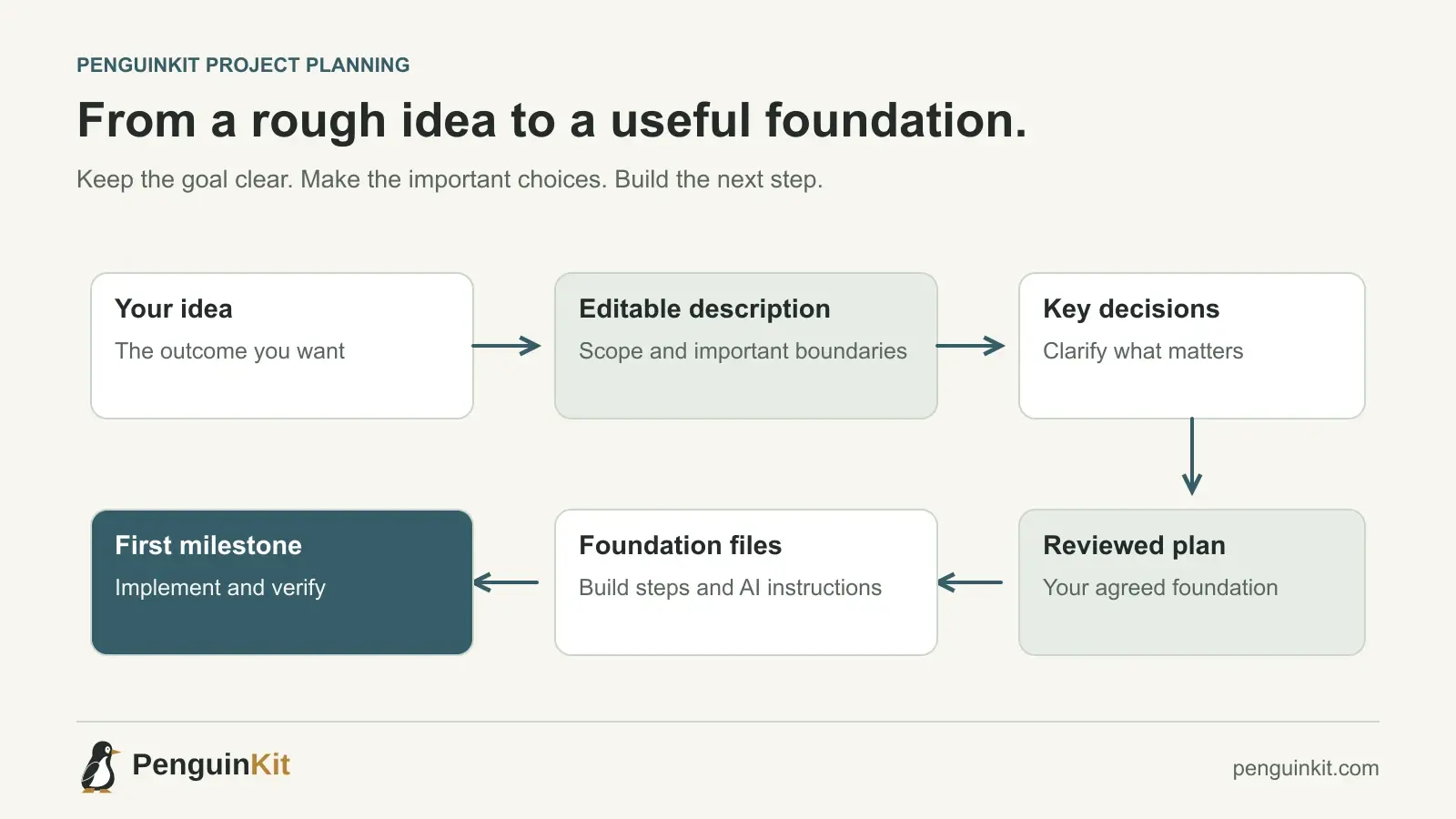
To plan a vibe coding project with PenguinKit, bring your idea or existing brief, review the project description, work through the consequential questions and decisions, then accept a full foundation plan before generating your downloadable documents. Give those documents to your chosen AI coding tool or developer and build one checked milestone at a time.
The aim is a useful foundation you can build on. You do not need to define every future feature or answer every implementation question before starting. You do need a coherent outcome, a sensible approach and enough clarity to avoid guessing the decisions that could change the whole project.
Begin with the problem you want to solve
A small volunteer organization wants a better way to handle expense claims. Members currently send receipts through several channels. The coordinator wants one place to collect submissions and export the approved records for bookkeeping.
That is a useful starting point. It explains who struggles, what they do today and what should improve. It does not yet establish whether the right solution is a hosted app, an existing form with an automation or a simpler local process.
A first description could be:
Our volunteer group needs one place for members to submit expenses.
The coordinator reviews them and exports approved claims as CSV.
We have a small team and no dedicated IT staff.
Do not pay claims automatically or connect to a bank.
I am open to a simple solution and need help choosing an approach.
Your actual brief can be rougher or much more detailed. Preserve what you already know rather than stripping useful requirements out to fit a template.
Sign in and bring the context you already have
Start your project in PenguinKit. You can type or paste the idea, or attach a supported text-based PDF or DOCX brief. Keep credentials and unnecessary personal information out of the input.
If you already have a specification, include the important permissions, operating constraints, chosen tools and exclusions. If you have working code, describe its current state and what you want to change. Do not describe an implemented system as a brand-new build unless that is your intention.
The project documents can guide an existing implementation, but PenguinKit does not automatically inspect your code repository. Your implementing tool or developer must inspect that work when you hand over the plan.
Review the editable project description
The initial description is your first chance to correct the direction before deeper planning. Read it for meaning rather than polishing every sentence.
For the volunteer expense project, check these points:
- Members submit claims; the coordinator reviews them.
- CSV export is part of the intended outcome.
- The first version does not transfer money.
- Low maintenance is a real constraint.
- The technical approach is still a recommendation to consider.
Correct missing details and statements that sound more certain than your input. “We may need approval” is not the same as “every claim requires approval.” An assumption should not quietly become a confirmed business rule.
Choose the access option shown for your account
After reviewing the description, continue using an available project allowance or the purchase option shown in the app. Eligible accounts can use a complete free project; Premium offers the more capable planning option. Review the displayed offer before choosing.
The planning purpose stays the same: clarify consequential requirements and create a project foundation. Neither option is a completed application or a promise that every generated recommendation is correct.
Answer questions that change the foundation
A meaningful question changes the workflow, risk or approach. For the expense project, who can view a member’s receipt matters more than the initial button color. Whether a coordinator may approve their own claim could change the permission model.
There is no useful universal question count. A detailed brief may already settle the important choices. A messy brief may need a short discussion to distinguish a genuine conflict from an ordinary detail that can remain open.
Where decision help is offered, use it to understand the recommendation and alternatives. Read the suggested answer and edit it before accepting. A recommendation becomes your decision only when you choose it; the tool’s confidence is not a substitute for your intent.
Review the proposed approach without overengineering
Ask whether the approach fits the work, maintenance capacity and risk. The volunteer group might be better served by an existing tool and modest automation than a custom application. If custom software is justified, the plan should explain the reason and keep the first build manageable.
Different projects need different foundations:
- A local reporting script may need safe input handling and clear invocation instructions, without hosting or accounts.
- A scheduled automation may need permissions, rerun behavior and visible failures, without a custom dashboard.
- A shared app may need authentication, ownership boundaries and persistent data.
Our guide to choosing between a script, automation and app can help you frame that decision.
Accept a plan you can explain
The full foundation plan should organize the outcome, scope, major workflows, proposed setup, important safeguards and practical build direction. Review it before requesting the documents.
Try explaining the first milestone in your own words. For the expense project, it might be “a member can submit a claim, see it after refreshing and remain unable to read another member’s claim.” That is a useful behavior to build and check.
Request a change if the plan omits an important requirement or makes a consequential assumption you do not accept. Keep ordinary later decisions visible without demanding a complete specification for every future release.
Generate the documents and hand them to your builder
After accepting the plan, generate and download the project foundation. The ZIP contains organized Markdown guidance, a starting guide, a file map and instructions for working with AI tools.
Follow the getting-started guide. Open the documents in your chosen environment and supply the relevant files to Cursor, Claude Code, Codex, ChatGPT or a developer. File handling differs between tools; do not assume an automatic import or connection.
A useful first handoff is:
Read the starting guide and the scope, build plan and open decisions.
Inspect existing code or workflow configuration if available.
Explain what already exists and propose the next useful milestone.
Preserve the accepted boundaries and identify the checks needed.
Do not claim that planned work or written checks have already run.
Keep the foundation aligned as the project changes
Once implementation starts, new information is normal. A tool may have a constraint you need to verify. A user may reveal a simpler workflow. An accepted feature may become unnecessary.
Record material changes and keep the current plan, implementation and next milestone aligned. Before changing a working system, inspect it and consider affected data and permissions. Planning should make progress easier, not freeze the project into its first description.
Common questions
Do I need a complete specification before using PenguinKit?
No. Bring the context you have. The useful goal is enough clarity for a sound foundation, while leaving ordinary implementation detail and future features open where appropriate.
Does PenguinKit build the application?
It provides the project foundation and implementation guidance. Your chosen tool or developer carries out the build, checks it and handles deployment when needed.
Can I use the plan with an app that already exists?
Describe the current implementation and intended change. At handoff, ask the builder to inspect existing work and choose the next useful step rather than restarting automatically.
Give your idea a clear starting point.
Bring an idea or an existing brief. PenguinKit helps you shape a project foundation you can review, refine and build from.
Start your project