
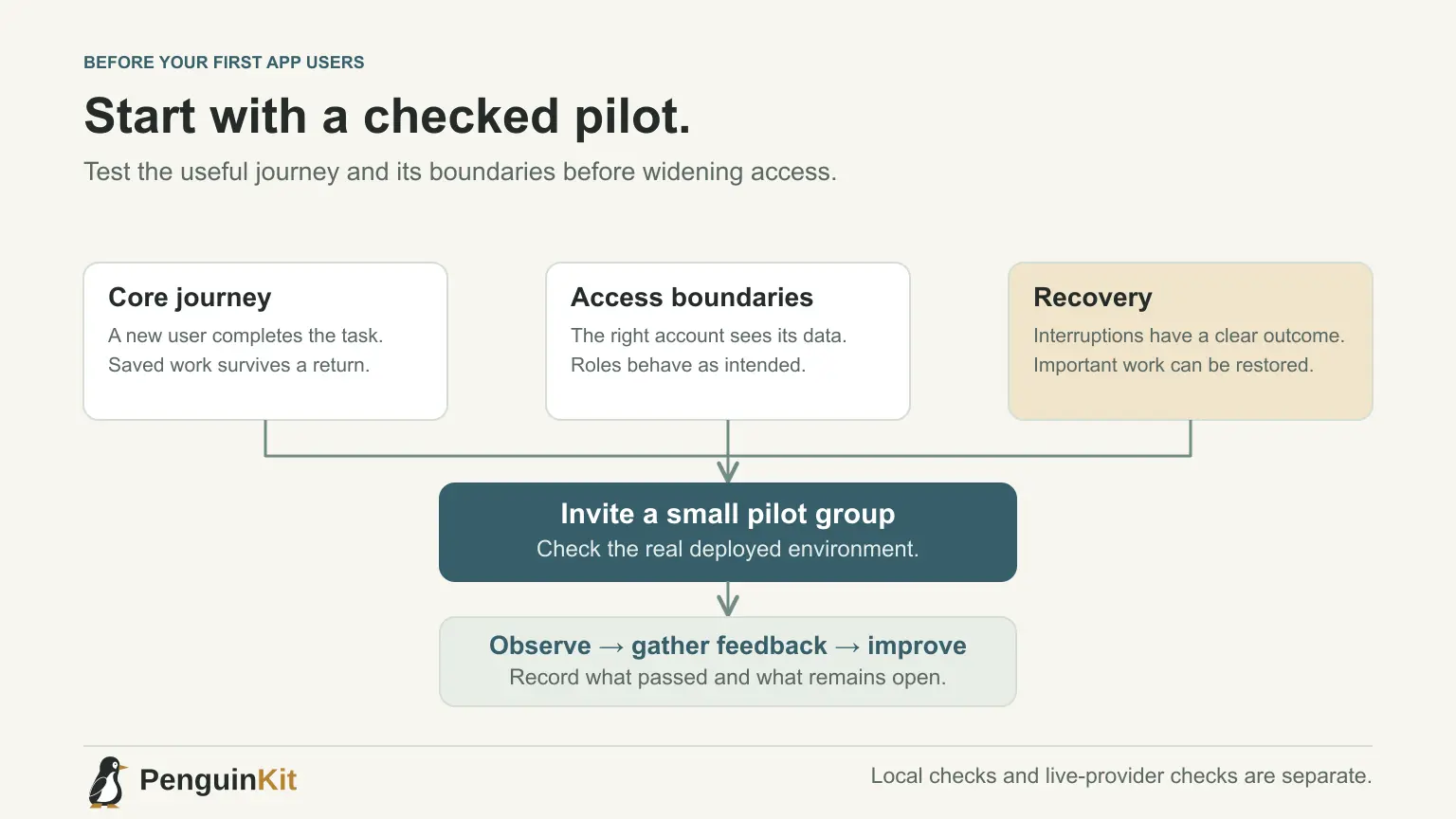
A vibe-coded app is ready for first users when its intended journey works in the real environment and the important boundaries have been checked. An attractive homepage or a successful local demo is useful progress, but it is not the whole launch check.
Start with a small pilot rather than unlimited public access. Invite a few people who understand the app's scope, watch the result and keep a way to recover. The checklist below is a starting point to adapt to your actual data and risks, not a certification of security or production readiness.
Define what the pilot is meant to prove
Choose one user journey and one learning goal. For a small team-request app, the journey might be: a team member submits a request, the right manager sees it and the member sees the decision.
Your learning goal could be whether this removes a repeated manual handoff. It should not depend on every future integration, subscription tier or reporting feature being ready.
Write what users can rely on and what is still experimental. Prepare fictional records for checks before loading real business information.
Repeat the journey in the deployed environment
Test the actual URL, configuration and services the pilot will use. A local result does not establish that hosted authentication redirects, storage access or email delivery work.
Walk through a fresh start, not only your already-signed-in administrator session. Complete the useful task, reload or return later, then confirm the result is still present where persistence is expected.
Ask the builder to report deployed checks separately from local checks. “Build passed” is not evidence that a third-party email arrived or that a signed payment event was processed.
Check who can see and change each record
If the app has accounts or teams, test the access boundary with separate test accounts. In the request-app example, one team should not see another team's requests, and a regular member should not acquire manager powers by changing a URL or submitting a modified request.
Hiding a control on the screen is not sufficient authorisation. Ask the developer to verify the server or storage boundary that actually protects the record.
For a personal local tool, the relevant checks may instead concern which files it can read and modify. Use proportionate controls for the project's real environment. See the B2B SaaS checklist for shared customer workspaces.
Make interruptions recoverable
Try a rejected request or an unavailable external service. Does the interface keep the user's work? Does it distinguish pending from completed? Can the user repeat an operation safely under the intended duplication rule?
When the app promises to send or generate something, verify the delivered result. A success message should not stand in for an email, file or stored update that never arrived.
For a destructive action, confirm the target and recovery route before testing. Do not experiment on a customer's real records merely to see whether deletion works.
Keep a practical recovery plan
Save the release version and know how to return to it. Verify that data needing protection has an appropriate backup and that you understand how to restore it.
Code rollback and data recovery are different. If a release changes the database, an older application version may not work with the new schema. Ask for the specific compatibility and recovery plan before applying the change.
A small pilot does not need an elaborate deployment platform. It does need a clear way to stop an unsafe operation and recover the important state.
Check third-party dependencies you actually use
If your journey includes payments, test the provider's supported sandbox flow and signed event delivery. Confirm live settings separately before accepting real customers; do not use a real card merely to imitate a sandbox test.
For email, inspect delivery and the return links in the actual environment. For external automations, check credentials, permissions and what happens when the connection expires.
Keep secrets on the appropriate server or local configuration boundary. Ask the builder to verify they are not bundled into public browser code or published in the repository. Label any check you cannot complete rather than silently calling it passed.
Give users a clear route when something goes wrong
Show helpful empty states and errors. A new user should know whether they need to add something, wait for an operation or contact support.
Collect enough operational information to investigate a failure: the stage, time and a reference if appropriate. Avoid collecting full customer content by default in broad logs.
For a paid app, make the offer, delivery and support terms visible at the relevant point. Keep claims tied to the behaviour you have verified. If you are unsure about required legal notices for the audience or data involved, obtain suitable advice before wider release.
Use a short pilot acceptance list
- A new user completes the core journey at the deployed URL.
- Saved work survives the expected reload or return visit.
- Account and role boundaries hold where relevant.
- A failed operation gives an honest outcome and a recovery route.
- Actual files, messages or external results arrive when promised.
- Release recovery and important-data restoration are understood.
- A support contact and useful feedback route are available.
Record what passed, the environment and any unresolved risk. Expand access when the evidence supports it, rather than treating a checklist as an automatic launch approval.
Plan the foundation before widening the app
Start with PenguinKit to clarify the project's scope, important technical decisions and build milestones. The foundation helps your builder prepare for implementation and verification; it does not certify the finished application's safety.
Use the beginner roadmap if you are still choosing your first milestone. A pilot is your next learning step, not a reason to build every future feature at once.
Give your idea a clear starting point.
Bring an idea or an existing brief. PenguinKit helps you shape a project foundation you can review, refine and build from.
Start your project