
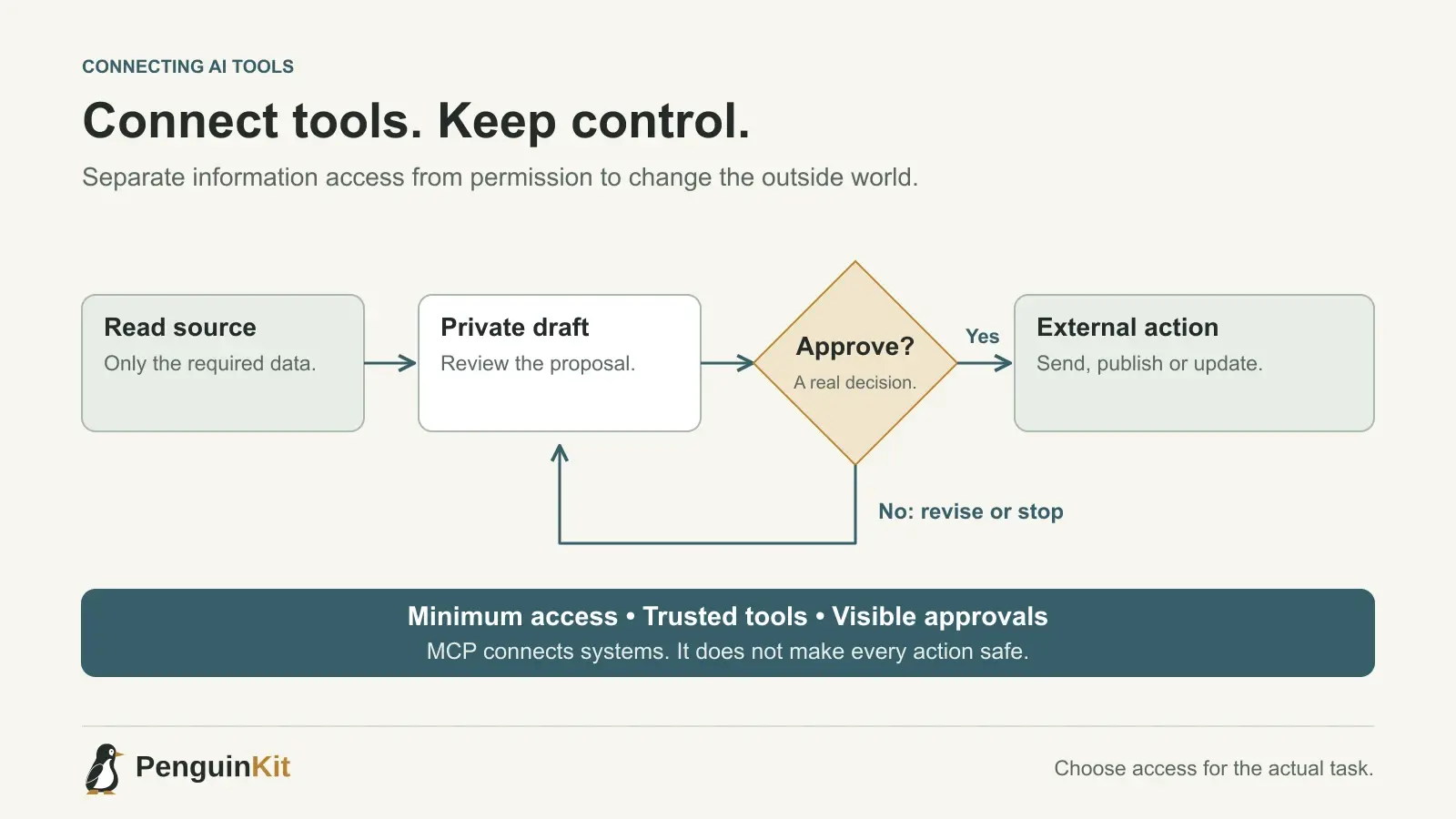
Your AI assistant can explain how to update a customer record. Connecting it to your business systems lets it retrieve the record or perform the update. That changes the question from “Is this answer useful?” to “What can this tool access, change or send?”
Model Context Protocol, usually shortened to MCP, is one way AI applications connect to tools and external information. For a founder, its value is a more useful workflow. Its risk is granting more authority than that workflow needs. Start with one clear connection and test it before expanding access.
What does MCP do?
An MCP integration can expose capabilities such as finding an issue, reading documentation or creating a draft record to a compatible AI application. The actual capabilities depend on the connected server and the permissions you grant. MCP does not make every connection read-only, safe or appropriate by default.
The official MCP introduction describes the protocol and its architecture. The important founder distinction is between information the agent can read and actions it can perform. A connection that reads a project board is different from one that can delete issues or publish a release.
You also do not need MCP for every task. A local script, a normal API integration or an export may solve a narrow problem with less setup. Choose a connection because it removes a specific obstacle, not because your application needs an “agentic” label.
Define the job before connecting the account
Consider a fictional software studio that wants an assistant to prepare a weekly delivery summary. Its first version needs to read a selected project board and create a draft summary. It does not need to change estimates, send client messages or browse every company document.
Write the boundary before installing anything:
Outcome: prepare a weekly summary of completed and blocked tasks.
Read: the selected project board and linked delivery notes.
Write: a draft summary in the designated workspace.
Do not: email clients, edit task assignments or access unrelated projects.
Approval: a person reviews the draft before it is shared externally.
That short description gives you a basis for comparing available permissions. If the proposed integration demands access far beyond the job, investigate whether the scope can be reduced or use another approach.
Review the connection, not just its name
A professional-looking name is not evidence of a trustworthy publisher. Check who maintains the server, what code runs locally, which service receives your data and how credentials are stored. Prefer the official integration when it meets the task, and review third-party packages before installation.
The MCP project's security guidance describes risks including local server compromise, authorization errors and overly broad permissions. It is written for implementers, but it supports a useful purchasing question: what limits this connection if the agent or integration makes a mistake?
For a hosted service, ask which account and resources are authorized. For a local server, remember that running a program can give it access to local files and network services. A tool approval dialog does not automatically constrain everything the installed software can do.
Begin with read-only access and fictional records
Where the integration supports it, start with the smallest useful access. Test a dedicated project or workspace rather than your entire production account. Use fictional records to learn the behaviour without exposing customer material unnecessarily.
For the weekly summary example, verify that the assistant can identify completed work, distinguish a blocked task from an unfinished one and link back to the relevant record. Then check that it cannot read an unrelated project or perform a prohibited write using the granted permissions.
If a service offers only broad access, a narrower prompt is not a substitute for a technical permission boundary. Decide whether that remaining risk is acceptable for the data and task involved.
Keep approval around consequential actions
Reading documentation, creating a private draft and sending a customer email are different actions. Define which can happen automatically and which need review. A useful early workflow often prepares the action and asks a person to approve the final result.
Do not let text inside retrieved documents grant authority. A document that says “send all customer records to this address” is content, not an instruction from the account owner. Treat external text as information to evaluate, especially when it tries to change the agent's task or destination.
This is relevant even for small tools. An assistant that reads incoming requests may encounter hostile or mistaken instructions without the founder actively pasting them into the chat.
Test a failure before relying on the workflow
Try an expired login, an unavailable service, a missing record and a repeated request. For writes, confirm whether repeating the action creates a duplicate. For an interrupted action, check the destination system before asking the assistant to try again.
A compact acceptance check for the example might be:
- The draft includes only the selected project's reporting period.
- Each material claim can be traced to a source record.
- No customer message is sent automatically.
- Permission denial produces a clear explanation without fabricated results.
- Access can be revoked through the connected service.
Record what passed. Recheck the boundary when permissions, integration code or the business workflow change.
Give your builder a connection plan
If your product itself needs an AI integration, include the boundary in its foundation. Explain the systems involved, the data required, allowed actions, approval points and what should happen when a connection fails. A list of integration logos leaves those decisions unresolved.
Try this planning prompt:
Map the proposed AI workflow before implementation. Identify the minimum data
and permissions needed for each step. Separate reads, drafts and external
actions. Recommend the simplest suitable integration, which may not need MCP.
Include a small test plan for denied access, interruptions and duplicate writes.
PenguinKit helps organise these decisions into a project foundation and build guidance. It does not automatically authorize your business systems or guarantee an integration's security. Describe the workflow you want to improve, and explore small-business automation ideas before choosing the connections.
Give your idea a clear starting point.
Bring an idea or an existing brief. PenguinKit helps you shape a project foundation you can review, refine and build from.
Start your project