
Your coding agent has produced a working feature. In the next session, it changes your database library, invents a different folder structure and forgets the command that runs your tests. You explain the project again, and the same corrections begin to accumulate.
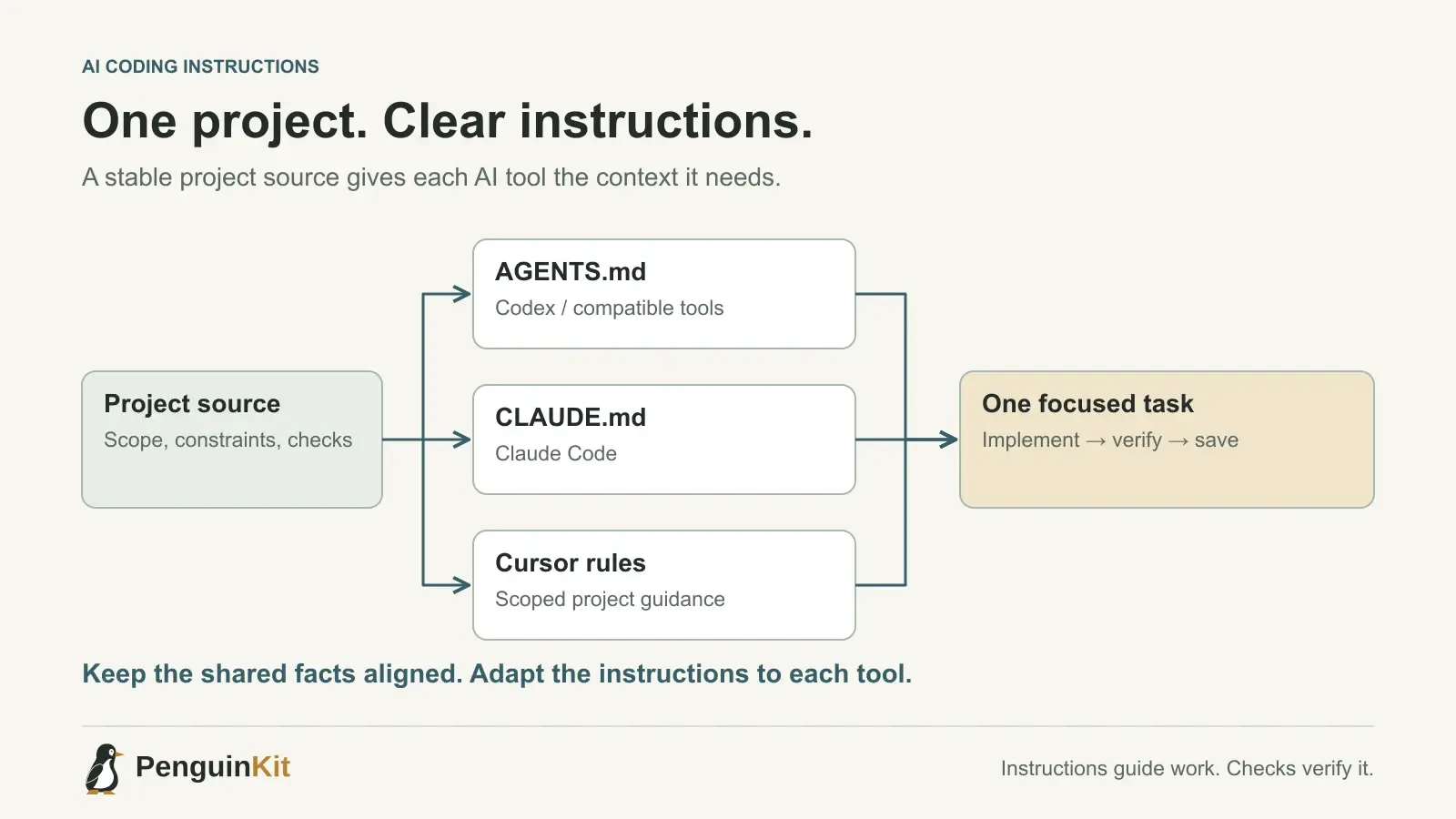
A small repository instruction file can reduce that repetition. The aim is to preserve useful project knowledge, not to write a constitution for every line of code. This guide explains what belongs in AGENTS.md, CLAUDE.md and Cursor rules, with a practical starting example for a founder building a small application.
What are AGENTS.md, CLAUDE.md and Cursor rules?
They are ways to give an AI coding tool persistent project instructions. Loading behaviour differs between tools, so a familiar filename is not a universal guarantee that every assistant reads it.
- AGENTS.md: a plain Markdown instruction file supported by tools including Codex and Cursor. OpenAI documents how Codex discovers instructions and how their directory scope affects the result in its AGENTS.md guide.
- CLAUDE.md: Claude Code's project memory mechanism. Its memory documentation explains the locations and instruction hierarchy.
- Cursor rules: instructions scoped to a project or particular files. Cursor documents
.mdcfiles in.cursor/rulesand supports a simpler AGENTS.md alternative in its rules documentation.
Use the mechanism your installed tool supports. If you use several tools, maintain one clear project source of truth and small tool-specific instructions that refer to it. Do not maintain three contradictory descriptions of the application.
Why shorter instructions deserve attention
More context is not automatically better context. In September 2026, OpenAI published guidance on revisiting accumulated skills and prompts. The practical implication for a founder is straightforward: keep the details that change how your project should be built, and remove repeated coaching that no longer helps.
An instruction file is useful when it answers questions the agent cannot safely infer from generic knowledge. Which module owns billing? Which command checks the project? Is this a local utility or a hosted service? Which existing files demonstrate the preferred approach?
For a broader explanation of durable project facts and session handoffs, see our guide to managing context in AI coding. This article focuses on the reusable instructions that sit beside the code.
Start with a compact project instruction file
The following is a fictional example for a small customer-enquiry application. Replace the paths and commands after inspecting your own repository; these filenames are examples, not a required architecture.
# Project instructions

## Purpose
Help a small team record enquiries and follow up with customers.
This is a hosted application with individual user accounts.

## Project references
- Read docs/project-overview.md for current scope.
- Read docs/decisions.md for accepted technical choices.
- Inspect existing code before proposing a replacement.

## Working conventions
- Follow the existing TypeScript and data-access patterns.
- Check record ownership on the server before returning private data.
- Validate external input at the application boundary.
- Keep credentials out of source files, prompts and logs.

## Verification
- Find the actual check commands in package.json.
- Run the checks relevant to the change.
- For a save operation, verify that the record survives a reload.
- Report what was tested and what still needs provider access.

## Change boundaries
- Preserve unrelated work in the checkout.
- Ask before destructive database changes or production actions.
Notice what the example leaves out: a speculative microservice architecture, a long list of libraries to install and a requirement to apply every enterprise pattern to a small app. The instructions should fit the project's risk and size.
Separate permanent guidance from the current task
“Use the existing data-access layer” is a durable convention. “Fix the enquiry form today” is a task. The current progress report belongs in a maintained status note rather than in permanent instructions that will still load six months later.
Keep these responsibilities separate:
| Information | Useful home |
|---|---|
| How the agent should work in this repository | Supported instruction file |
| What the product is and who it serves | Project overview |
| Accepted choices and their reasons | Decisions note |
| The change to make now | Current task prompt |
| Completed checks and remaining work | Status or handoff note |
For a tiny script, a README and a short instruction file may be enough. Add documents when they prevent a real misunderstanding, not because a template contains another heading.
Make a rule specific enough to verify
“Write secure, excellent code” gives the agent little project-specific direction. “Before returning an enquiry, verify it belongs to the authenticated account” describes a concrete boundary. “Use SOLID everywhere” is less useful than pointing to the existing service that owns a business operation and explaining when another abstraction would help.
Use stable references rather than copying implementation details into several files. If the test command changes, update the canonical reference. If a rule no longer reflects the architecture, revise it before asking the agent to follow it.
Instructions are guidance, not enforcement. Authorization checks, tests and secret handling still need to exist in code and infrastructure. A sentence saying “never expose customer data” does not protect an endpoint by itself.
Check that the instructions are actually helping
Try a small, low-risk change and inspect the result. Ask the agent which project instructions it used, but also check the changed files and verification evidence; a confident explanation is not proof of compliance.
Useful signals include whether the agent reuses the intended module, runs the correct checks and preserves a boundary that was previously missed. If the same mistake returns, investigate both the instruction and the implementation. Adding more emphatic wording may not address the cause.
Use this prompt to clean up an existing collection:
Inspect the repository and its existing instruction files. Identify stale,
duplicated or contradictory guidance. Propose a compact set of instructions
based on actual commands, current architecture and important safety boundaries.
Keep task history separate. Do not change application code in this pass.
Give the agent a foundation it can use
The useful outcome is a project whose purpose, accepted decisions and next step remain understandable between sessions. PenguinKit helps turn an idea or brief into that project foundation and practical build guidance; implementation still happens in your chosen tool and workspace.
Start with your project idea, or read how to hand off a project plan to an AI coding tool. Keep the enduring instructions small enough to maintain and specific enough to matter.
Give your idea a clear starting point.
Bring an idea or an existing brief. PenguinKit helps you shape a project foundation you can review, refine and build from.
Start your project