
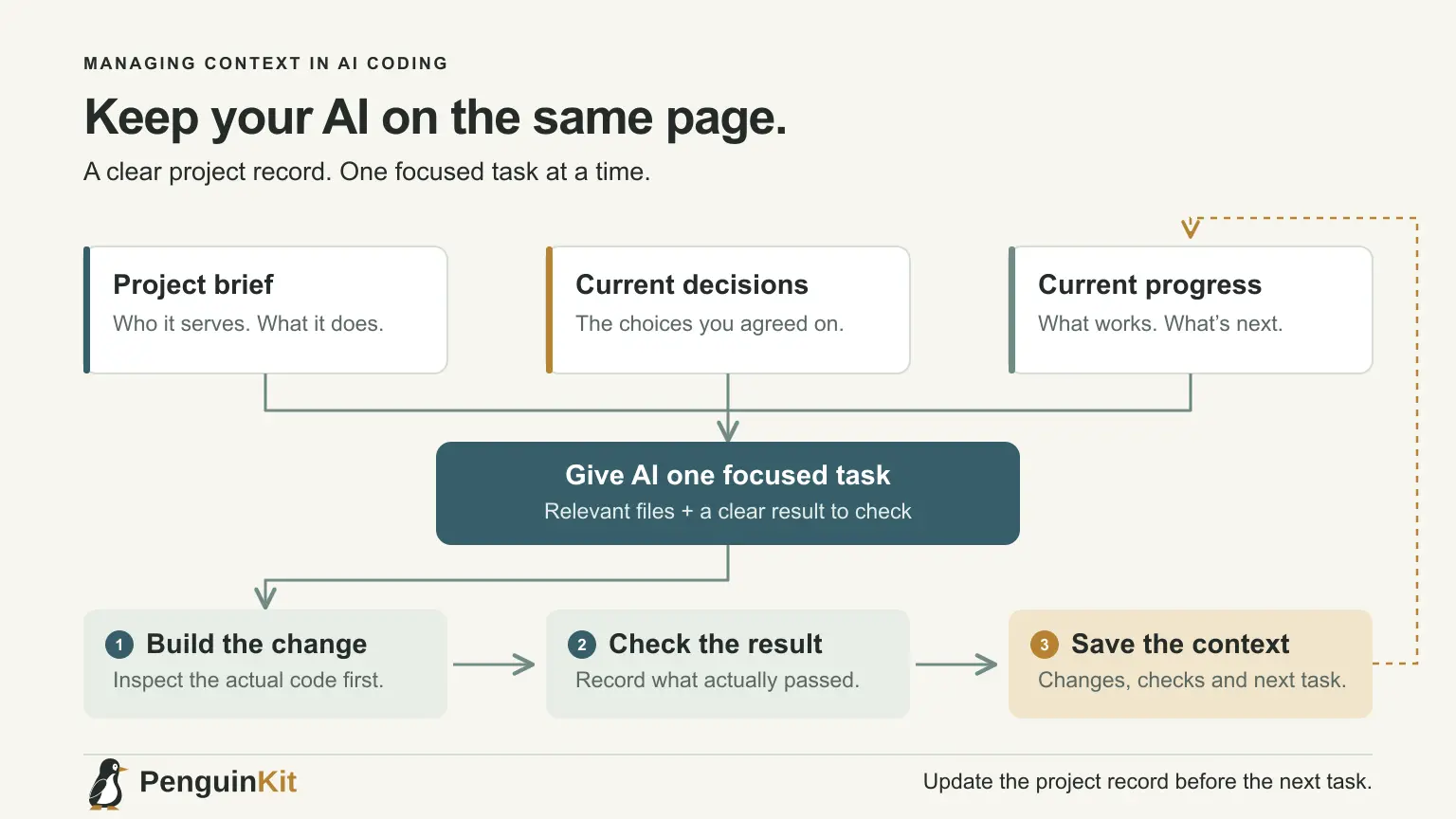
Context in AI coding is the information a tool has available when it decides what to do: your instructions, relevant files, earlier messages and results from its tools. When that information is missing, stale or contradictory, the builder may produce a plausible change for the wrong project.
Managing context does not mean pasting your entire history into every prompt. Keep durable project decisions in a few maintained files, then give each task the specific evidence it needs. This is useful whether you are building with Cursor, Claude Code or another AI coding environment.
Separate project facts from the current task
Project facts explain what you are building. Task context explains what you want changed now. Mixing them into one growing message makes both harder to maintain.
For a simple appointment-request app, durable facts might say that visitors request a time and a staff member confirms it. The current task might be to prevent a visitor from selecting a past date. That task needs the relevant form, validation behaviour and expected date rule; it does not need every old design conversation.
Keep the distinction visible:
| Context | What belongs here |
|---|---|
| Project direction | Users, useful workflow, scope and chosen approach |
| Working instructions | How to run and check the project; important constraints |
| Current task | Requested change, relevant files, examples and completion check |
| Current status | What works, what failed and the next unresolved step |
Keep a small source of truth in the workspace
Use a handful of readable project documents, adapted to your tool. For example, a project overview, a decisions note and a short status note may be enough. These names are organisational suggestions, not magic filenames that every tool automatically reads.
Put stable facts in the overview. Put meaningful choices and their reasons in the decisions note. Put recent evidence and next steps in the status note. Avoid copying the same rule into several files; conflicting copies create another context problem.
Some tools support automatically loaded instruction files. Claude Code documents how CLAUDE.md provides persistent project instructions. Check your installed tool's documentation for file names, scope and loading behaviour. A supported instruction file helps carry context, but it does not guarantee the agent follows every instruction.
Preserve decisions, including decisions you changed
Suppose the appointment app initially planned automatic confirmations, but you later chose staff approval. Replace the old active requirement and keep a short reason for the change. Do not leave both versions presented as current instructions.
A useful decision record says:
Current decision: A request is not a confirmed appointment.
Reason: Staff must check availability before confirming.
Replaces: The early suggestion to confirm automatically.
Implementation impact: Display pending status and avoid confirmation wording.
Separate explicit requirements from recommendations and unresolved choices. This lets the builder adapt without quietly turning a suggestion into a promise.
Give the next task only the relevant evidence
Ask the agent to inspect the relevant implementation and project notes. If you know the file or screen involved, point to it. If you do not, describe the user action clearly and let the agent locate the path.
For the past-date bug, supply the expected date rule, the input that reproduced it and any useful error message. Avoid attaching unrelated exports, generated build files or a complete log history.
Use an instruction such as:
Read the project overview and current decisions. Inspect the appointment form
and its validation before editing. Fix past-date selection under the agreed
time-zone rule. Preserve staff approval. Verify a past date, an allowed date
and the relevant day boundary. Report actual results.
If the time-zone rule is unresolved and changes the expected outcome, clarify it. Context management should surface a meaningful ambiguity, not hide it.
Treat conversation summaries as handoffs to verify
A long chat may be summarised or restarted. Before that happens, save the current goal, decisions, changed files, verified results and remaining issue. Leave out speculative approaches that were abandoned unless they explain a current constraint.
Ask the next session to compare the handoff with the current files. The code may have changed since the summary was written. Do not assume a saved note proves the current implementation is correct.
For tool-specific behaviour, use Claude Code's memory documentation or your tool's equivalent. A conversation history and a maintained project record serve different purposes; neither should contain production passwords.
Keep secrets out of the context you share
Do not paste API keys, passwords or real customer records into a reusable project note. Use fictional samples and describe configuration by variable name rather than value.
An ignore file is not a complete security boundary. Cursor notes that terminal and MCP tools can still access files outside its ignore controls. Use appropriate file permissions and tool approvals as well, and review what you actually share.
Review context when the agent starts drifting
If a builder keeps reintroducing an abandoned feature, first check whether old instructions still describe it as required. If it repeats a completed task, check whether the status note records completion. If it guesses the architecture, point it to the agreed decision and actual implementation.
Repair the source of confusion before adding another paragraph of increasingly emphatic instructions. Then run one bounded task to see whether behaviour improves. The cost-control guide explains why repeated, poorly scoped corrections are worth tracking.
Carry your foundation into implementation
PenguinKit helps organise project direction and build guidance before implementation. Start with your idea, then use the resulting foundation alongside the real workspace rather than treating it as a replacement for code inspection.
For a practical implementation handoff, see how to give your project plan to an AI coding tool. Keep the important decisions durable and the current task focused.
Give your idea a clear starting point.
Bring an idea or an existing brief. PenguinKit helps you shape a project foundation you can review, refine and build from.
Start your project