
The Sprawl That Kills AI Codebases
When you start a greenfield project with an AI coding tool, progress feels miraculous. Within a weekend, you have an authentication flow, a database connection, a Stripe billing integration, and an interactive dashboard.
Then, around week three, strange inconsistencies begin to emerge.
In some files, user dates are formatted as 15 Oct 2026, while in others they appear as 2026-10-15T06:19:17.000Z. In your settings panel, user details update instantly, but on the main profile screen, old data persists until a hard page reload. When you inspect the repository, you discover something alarming:
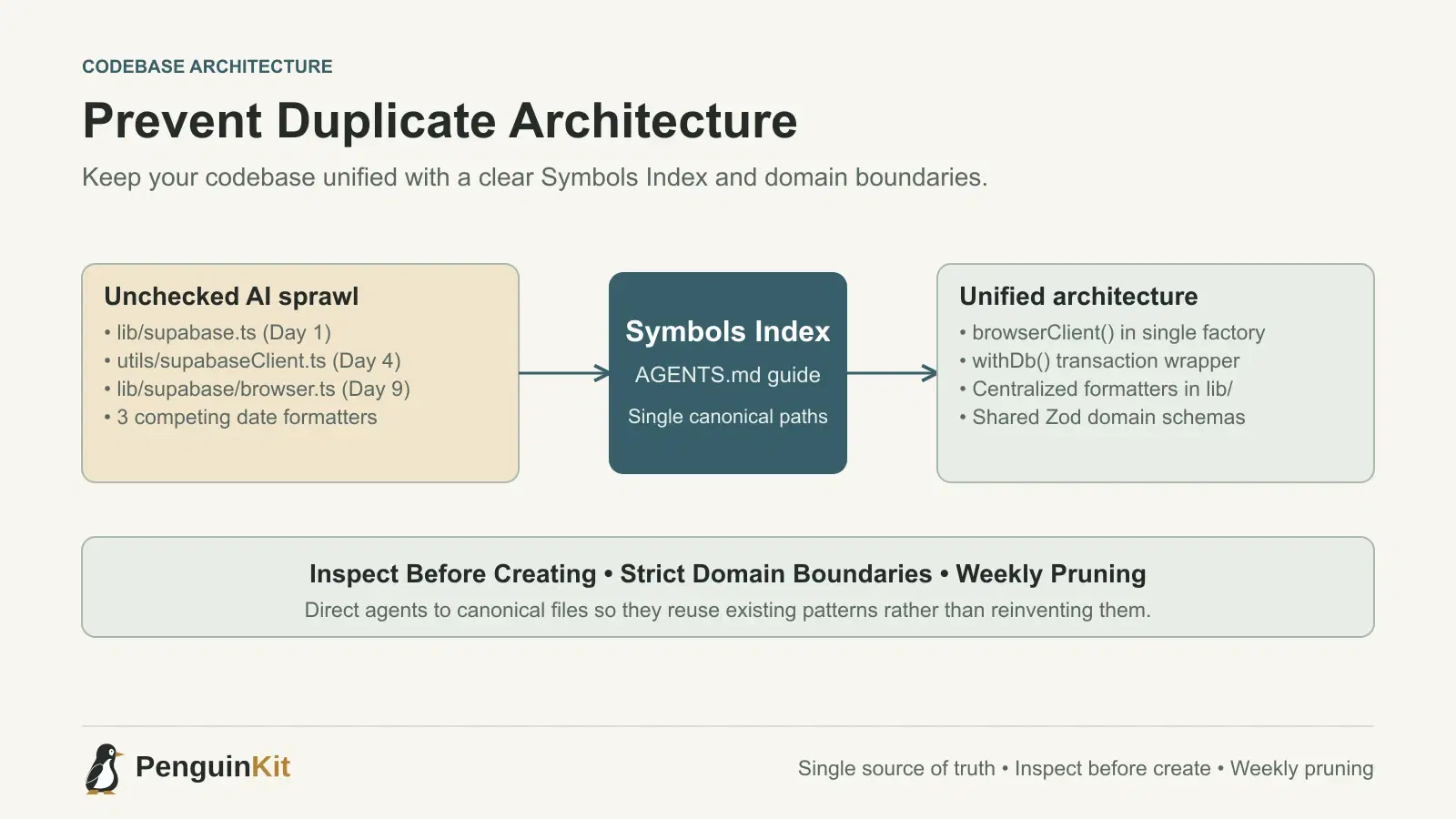
lib/supabase.ts(created on day one)utils/supabaseClient.ts(created on day four)lib/supabase/browser.ts(created on day nine)lib/supabase/server.ts(created on day twelve)hooks/useSupabase.ts(created on day fourteen)
You do not have one Supabase client; you have five separate Supabase initialization clients, each configured with slightly different caching strategies, cookies, and error handlers.
This phenomenon is known as duplicate architecture—or architectural fragmentation. It is the primary reason why vibe-coded software becomes progressively harder to maintain after the initial prototype.
Why AI Coding Tools Create Duplicate Architecture
AI models do not walk around your codebase browsing folders. They only read the files that are currently open in your editor, explicitly referenced in the prompt, or indexed in a partial vector search. When an AI agent encounters a task, it behaves like an eager contractor who builds a new tool shed in the backyard every morning because nobody told them where the garage was.
1. Zero Architectural Awareness by Default
When you instruct an AI: "Format this timestamp nicely in the invoice table," the model does not run a semantic search across your entire repository to see if you already wrote a date-formatting utility. It simply writes a brand-new helper function directly inside InvoiceTable.tsx or creates a new file called utils/formatters.ts.
2. Path and Library Inconsistencies
Depending on which training data snippet was activated, the model might use date-fns in one file, dayjs in a second, and vanilla Intl.DateTimeFormat in a third. Each time you prompt a new feature, you risk importing redundant npm packages and competing paradigms.
3. Divergent State and Session Management
The most dangerous form of duplication occurs in state and session management. If your billing webhook updates user credits using one server database client, but your front-end reads credits from a cached browser session hook that never invalidates, your users experience phantom credit balances.
| Architectural Element | Duplication Symptom | Real-World Risk | Prevention Strategy |
|---|---|---|---|
| API / Database Clients | Multiple client instances with conflicting auth states. | Token desynchronization and unexpected 401 errors. | Single factory file exporting browserClient and adminClient. |
| Utility Functions | Three different date or currency formatters across folders. | Inconsistent UI presentation and calculation errors. | Centralized @/lib/formatters.ts with strict symbol exports. |
| Authentication Guards | Middleware checks conflicting with API route checks. | Security vulnerabilities where unauthenticated requests slip through. | Unified server session helper used across all protected endpoints. |
| Data Validation | Zod schemas redefined separately in forms and API routes. | Type drift where front-end permits inputs that the server rejects. | Co-located domain schemas imported by both client and server. |
How to Prevent Duplicate Architecture
You do not need to abandon AI coding to maintain clean software architecture. You simply need to give your AI tools an explicit roadmap before they write code.
1. Build a Symbols Index in AGENTS.md or CLAUDE.md
AI agents rely on root-level instruction files like AGENTS.md, CLAUDE.md, or .cursorrules to orient themselves. Use this file to provide a compact Symbols Index that lists the canonical locations of core architecture.
Include a dedicated architecture section:
# Repository Architecture Index

Always import shared capabilities from these canonical locations:
- Supabase Browser Client: `@/lib/supabase/browser.ts` -> `browserClient()`
- Supabase Admin Client: `@/lib/supabase/admin.ts` -> `adminClient()`
- Current User Session: `@/lib/server/session.ts` -> `requireUser()`
- Formatting & Utilities: `@/lib/formatters.ts`
- Database Query Helper: `@/lib/server/db.ts` -> `withDb()`

CRITICAL RULE: Never create new utility files or database clients. If a helper already exists, import and reuse it.
When an agent reads this index at the start of a task, it immediately stops inventing parallel implementations.
2. Use the "Inspect Before Create" Prompting Rule
Never ask an AI model to write a utility or helper function directly. Always require an inspection step first.
Instead of prompting:
"Write a function to sanitize user input and prevent XSS."
Prompt like this:
"Check the repository to see if we already have input sanitization or validation utilities. List the relevant existing files and functions. If one exists, explain how we can reuse it. If none exists, specify the single file where it should be created."
Forcing the agent to search and report back before making code edits eliminates redundant files at the source.
3. Maintain Strict Domain Folder Boundaries
Chaotic folder structures encourage chaotic AI behavior. If your repository has helpers/, utils/, services/, lib/, and common/, the model has no way of knowing where a new piece of logic belongs.
Consolidate into clean, intuitive domain boundaries:
app/: Routing and UI page wrappers only.components/: Pure, reusable React UI components.lib/: Business logic, database wrappers, and third-party integrations.lib/server/: Server-only utilities that must never leak into client bundles.
Enforce this convention in your agent rules: "All database operations and private secrets must live under lib/server/. Never import from lib/server/ into client components."
4. Run Periodic Pruning Sweeps
Once a week, set aside thirty minutes for an architectural pruning sweep. Do not build new features during this session. Open your terminal and search for duplicate dependencies and patterns:
# Find duplicate client initializations
git grep "createClient"

# Find competing date libraries
grep -E "date-fns|dayjs|moment" package.json
Use your AI assistant specifically as a refactoring partner:
"Here are three files that format currency in slightly different ways:
lib/currency.ts,components/PricingCard.tsx, andapp/dashboard/billing/page.tsx. Consolidate all currency formatting intolib/formatters.tsusingIntl.NumberFormat, and update all imports."
Clean Architecture Accelerates AI Development
The cleaner and more standardized your codebase remains, the better your AI tools perform. When every database query uses the same withDb wrapper, and every authenticated endpoint uses the same requireUser guard, the AI generates accurate, bug-free code on the first attempt.
Architecture is not the enemy of vibe coding—it is the foundation that keeps it fast.
For more practical guidance on organizing AI instructions, read our guide to AGENTS.md, CLAUDE.md, and Cursor rules and learn how to choose a tech stack for your MVP. If you want an architecture specification that defines clean boundaries from day one, plan your project with PenguinKit.
Give your idea a clear starting point.
Bring an idea or an existing brief. PenguinKit helps you shape a project foundation you can review, refine and build from.
Start your project