
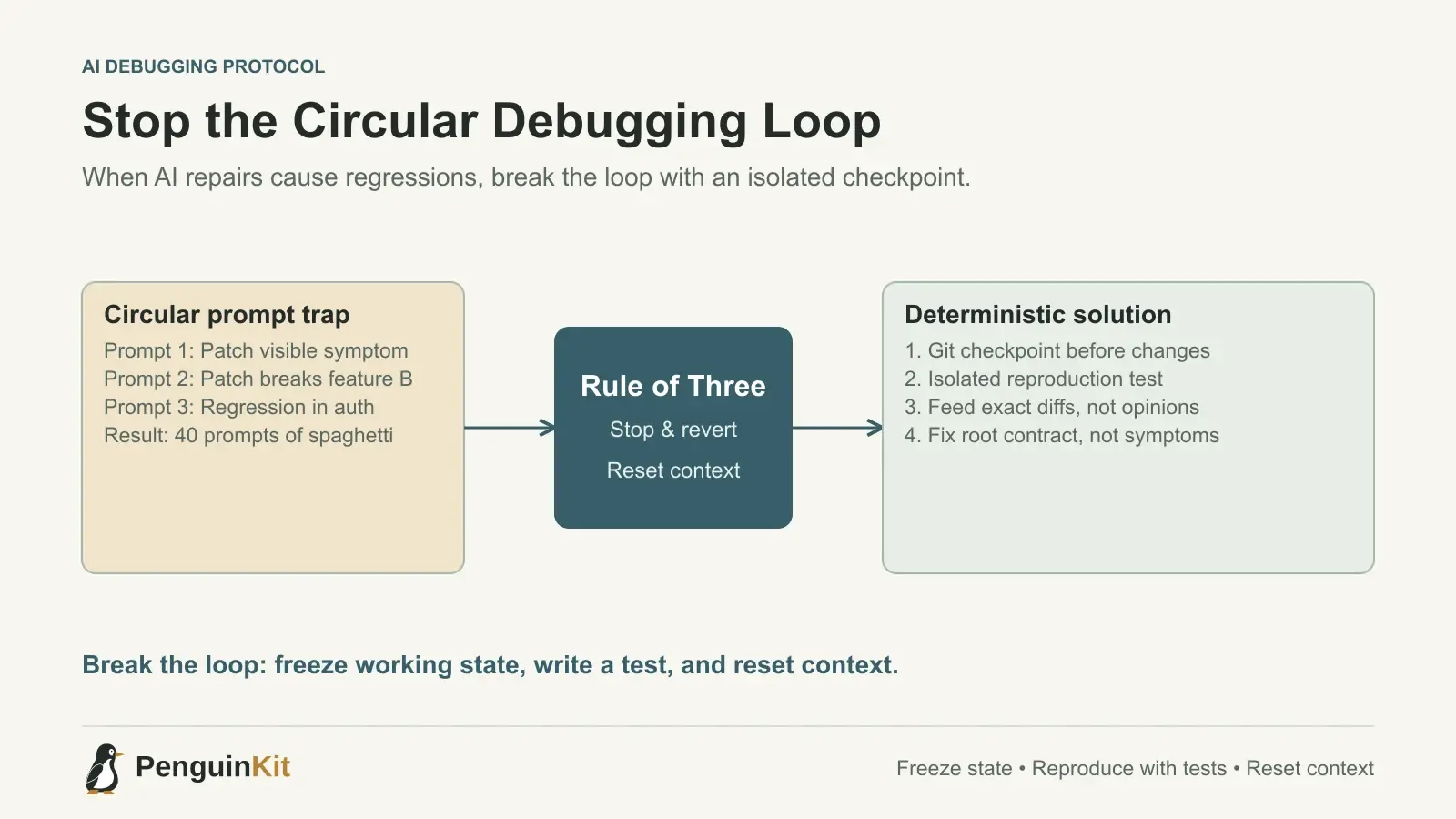
The 2:00 AM Prompting Spiral
Every founder who builds software with AI coding tools has experienced this exact scenario. You are working in Cursor, Claude Code, or Windsurf. You notice a small bug: when a user clicks the "Export CSV" button, the downloaded file is empty.
You highlight the function, hit Cmd+K or type in chat: "The export button downloads an empty file. Fix it."
The model cheerfully replies: "I fixed the issue by updating the stream handler." You run the app. Great—the CSV exports data! But now, clicking "Export" logs the user out.
You prompt again: "Now clicking export logs the user out. Fix that without touching auth."
The model apologizes: "My apologies! I removed the session check from the handler." You test again. The export works, login persists, but now the date formatting inside the CSV is corrupted with NaN-NaN-0NaN.
Three hours later, you have exchanged forty prompts, modified twenty files, and introduced twelve brand-new errors. You cannot remember what the code looked like before you started, and the app is in a worse state than when you sat down.
This is the circular debugging loop—the single biggest productivity trap in vibe coding. Understanding why it happens and following a strict protocol to break it will save you days of wasted effort.
Why AI Coding Tools Get Stuck in Loops
AI coding models do not possess an intuitive mental model of your running application. They predict text and code edits based on the context in their active window. When you fall into a debugging spiral, three technical factors drive the breakdown:
1. Context Window Pollution
As a chat session extends, the conversation history accumulates failed code snippets, conflicting error messages, and obsolete hypotheses. The model treats earlier hallucinated logic as valid historical precedent. Instead of reasoning from the original architecture, it reasons from its own recent mistakes.
2. Treating Symptoms Instead of Contracts
When presented with a localized error (e.g., TypeError: cannot read properties of undefined), models naturally choose the path of least resistance: they add a quick defensive check (like if (!user) return null; or optional chaining user?.profile?.settings?.id). This suppresses the visible crash, but it masks the root cause—such as an upstream API failing to return user relations. Two steps later, another component crashes because it expected that data.
3. Asymmetric Information
You see the browser console, the database state, and the network tab; the AI only sees what you paste. When you describe the error in conversational English ("it's still not working"), the model guesses what you mean, often modifying completely unrelated files.
| Debugging Trap | What the Founder Prompts | What Actually Happens | Better Technique |
|---|---|---|---|
| Vague symptom | "It still gives an error on click." | Model guesses and rewrites random UI logic. | Paste the exact console stack trace and network payload. |
| Defensive patch | "Fix the undefined reading error." | Model wraps null checks everywhere, hiding data leaks. | Demand an inspection of the upstream data source. |
| Prompt fatigue | "Try another approach." | Model abandons working patterns for exotic hacks. | Revert with Git, clear context, and write a reproduction test. |
| Conversational scope | 30+ prompt thread fixing 5 different issues. | Context degrades; earlier constraints are forgotten. | Strict "Rule of Three": 3 prompts max, then reset context. |
The 5 Rules to Stop Circular Debugging
To prevent hours of circular refactoring, implement these five mechanical safeguards in your vibe coding workflow.
Rule 1: The "Rule of Three" (When to Kill the Chat)
If an AI agent cannot resolve a bug within three prompts, continuing the thread has an almost zero percent probability of success. Stop typing.
- Prompt 1: State the symptom, the reproduction steps, and the exact error output.
- Prompt 2: Clarify any misunderstanding or provide the missing context (e.g., the database schema or payload structure).
- Prompt 3: If the second attempt fails or causes a regression, do not write Prompt 4.
Continuing past three prompts guarantees context pollution. Discard the active chat, revert your uncommitted changes, and start fresh.
Rule 2: Git Checkpoints Before Every Fix
Never let an AI agent touch code on a dirty working tree. Before asking an AI to debug an issue, create a temporary Git checkpoint:
git add -A
git commit -m "checkpoint: export csv button empty file bug"
If the model makes a mess, you can instantly return to a known baseline in one second:
git reset --hard HEAD
Without frequent checkpoints, you are forced to manually inspect dozens of AI modifications, trying to remember which lines were intentional and which were hallucinations.
Rule 3: Write a Minimal Reproduction Test
Instead of manually clicking through your browser interface after every prompt, isolate the failure in a minimal test script or unit test before asking the AI to fix it.
If an API route fails:
// test/repro-export.test.ts
import assert from 'node:assert/strict';
import { generateCsvPayload } from '@/lib/export';

const sampleRecords = [{ id: '1', amount: 100, date: '2026-10-15' }];
const output = generateCsvPayload(sampleRecords);

assert.ok(output.includes('100'), 'Payload must include amount');
Feed this exact test to the AI: "Make this reproduction test pass without modifying the test file or changing the return signature."
This gives the model a deterministic mathematical boundary. It knows immediately whether its fix succeeded without guessing.
Rule 4: Provide Diff Evidence, Not English Opinions
When an AI fix causes an unexpected regression, avoid emotional or narrative descriptions like "That completely broke the dashboard!" The model cannot debug an exclamation mark.
Instead, run:
git diff -U3
Paste the specific diff that introduced the problem back to the AI in a clean prompt:
"Your change in
lib/export.tsreplacedawait getSession()with a mock token, which caused session invalidation inmiddleware.ts. Revert that specific change and solve the CSV stream issue using standard Node stream piping."
Giving the AI the exact diff forces it to see the unintended side effects of its previous suggestion.
Rule 5: Isolate the Single Source of Truth
Most circular debugging happens because business logic is duplicated across multiple files. The AI fixes components/ExportModal.tsx, but the real export logic lives in app/api/export/route.ts or lib/csv.ts.
Before asking the AI to edit code, ask it to inspect first:
"List all files in the repository that reference
exportCsvor handle CSV formatting. Do not change any code yet. Just show me where the responsibilities lie."
Once the true boundary is identified, instruct the model to modify only that single file.
What to Do When You Are Completely Stuck
If you have tried three times and the bug persists:
- Revert to your last working commit using
git reset --hard. - Review your foundational assumptions. Is the database connection working? Are your environment variables set correctly in
.env.local? - Log the input and output boundaries. Add
console.logstatements at the entry and exit points of the function. - Consult your project plan. Often, bugs are not coding errors, but ambiguous requirements. If your specifications leave room for ambiguity, the AI will fill that void with unpredictable assumptions.
Before diving back into code, step back and review your system architecture. Clear boundaries and structured requirements make AI tools exponentially more effective.
For more strategies on keeping your coding tools on track, explore our guides on what to do when an AI coding agent keeps breaking your app and how to manage context in AI coding. If you need help structuring your project requirements into unambiguous AI instructions before you start building, start with PenguinKit.
Give your idea a clear starting point.
Bring an idea or an existing brief. PenguinKit helps you shape a project foundation you can review, refine and build from.
Start your project