
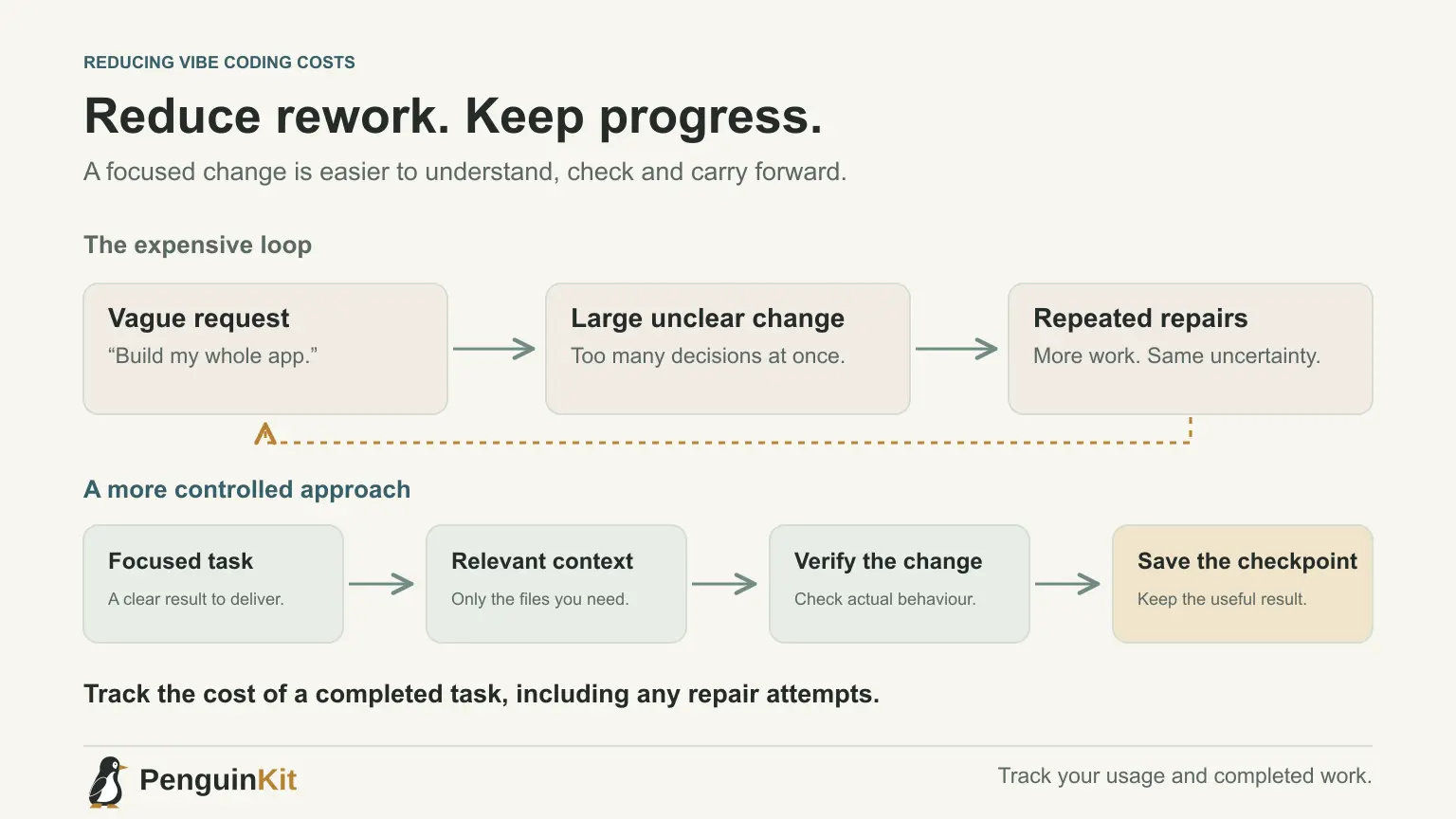
To reduce vibe coding costs, first reduce unnecessary work: repeated requests, oversized context, abandoned rewrites and changes you cannot verify. A cheaper model is not automatically cheaper overall if it needs more attempts to complete the same task.
This guide focuses on the cost of using an AI coding tool while building. Hosting and the running application's model usage are separate budget items, covered in how to budget an AI-built MVP. Check the actual billing rules of your tool before assuming every message or token is charged in the same way.
Find out what your account actually measures
Your plan may include usage allowances, usage-based charges or limits that affect when you can continue. A request count alone may not describe the work inside a coding-agent session.
Look at the account's usage view and current official terms. Note the selected model, any additional usage setting and whether a spending limit is available. Do not enable an open-ended extra-usage option without understanding it.
For Claude Code, the official cost guide explains usage tracking and ways to reduce token consumption. Use the documentation for your actual tool and plan; avoid copying a price from an old comparison article.
Give each request a result you can check
“Build my whole app” leaves many decisions open. “Add a saved filter to the existing enquiry list and verify that it still applies after reload” describes a smaller task with a visible outcome.
Include the relevant constraint and completion check at the start. If the tool needs to inspect files, let it find the implementation before editing. Asking for a detailed reconstruction of the entire repository on every small change adds work without necessarily helping.
This does not mean turning every task into a tiny prompt. Keep related work together when it forms one useful milestone. The goal is a coherent result, not the lowest possible message length.
Keep project context useful rather than huge
Maintain a short project overview and current decisions. Point to relevant files and a concise status note for the next task. Do not repeatedly paste entire conversations, duplicate documents or unrelated logs.
If the builder needs an error, provide the action that produced it and the relevant error details. A large unfiltered log dump can obscure the one signal needed to diagnose the problem.
See how to manage AI coding context for a practical structure. Context reduction should preserve important requirements and safety constraints. Removing those merely to shorten a request can create costly mistakes later.
Compare completed tasks, not single-call prices
An illustrative comparison makes the point. Suppose Approach A takes one request priced at two fictional resource units and completes a verified task. Approach B takes four requests at one fictional unit each before reaching the same result. The second approach used four units, not one.
These are invented units, not current provider prices or measured savings. In your own usage log, compare similar completed tasks and note repair attempts. Different models and tasks will behave differently.
Use a capable model when the task requires substantial reasoning. Try a less expensive option for well-defined work if your tool supports it, then check the result. Do not lower scrutiny for access control or sensitive-data handling because a model was cheaper.
Interrupt a repeated repair loop with evidence
When the same feature keeps breaking, another “try again” message may repeat the same approach. Pause and ask for the concrete failure, likely cause and evidence needed to distinguish possibilities.
For example, if a form reports success but saves no record, establish whether the request reached the server, whether storage rejected it and whether the interface interpreted the response correctly. Repair the demonstrated cause rather than redesigning unrelated screens.
Use the focused debugging guide to structure that request. A saved working checkpoint also makes it easier to undo a bad change without asking AI to reconstruct everything.
Check at the right scale
Ask for a relevant test or visible check after a bounded change. Run broader required checks before a release or when the change affects shared behaviour. Re-running every expensive operation after a spelling correction is rarely informative.
However, skipping meaningful checks can make rework worse. A billing change needs different evidence from a colour change. Choose checks according to the impact of the task, and record their actual results.
Avoid duplicating investigations across several agents unless the coordination benefits are clear. Parallel work can help, but multiple agents exploring the same files or changing the same area may consume more resources and introduce conflicting edits.
Keep a lightweight cost-and-rework note
For a few representative tasks, record:
- The intended result and whether it was delivered.
- The model or tool used.
- Usage shown by the provider, when available.
- Repair attempts and why they were needed.
- Which checks established completion.
Look for a repeated pattern. If most rework comes from changing requirements, clarify scope. If it comes from missing context, improve the handoff. If it comes from a provider error, investigate configuration rather than rewriting the feature.
Use planning to avoid building the wrong thing
A clear foundation can reduce avoidable ambiguity, although it does not guarantee a particular cost saving. Start with PenguinKit to organise your idea, discuss important choices and prepare implementation guidance.
Spend effort on one useful milestone, keep a recoverable version and measure what it took. That gives you a better basis for your next decision than chasing a universal “cheapest vibe coding” formula.
Give your idea a clear starting point.
Bring an idea or an existing brief. PenguinKit helps you shape a project foundation you can review, refine and build from.
Start your project