
The prototype looks convincing. People can click through the screens, and the core idea is easy to demonstrate. Now you want to add a feature, invite a customer or bring in a developer—and it is surprisingly difficult to explain what the application actually does behind the interface.
The next step is an evidence-based handoff. Establish what works, record the decisions the prototype has already made and choose one manageable improvement. Do not assume the code must be discarded, and do not assume a good-looking demonstration is ready for customers.
Begin with an inventory, not a rebuild request
“Make this production-ready” can turn into an uncontrolled rewrite. It leaves the builder to decide your architecture, release standard and budget at the same time. Start with a review of the real workspace instead.
Ask where the source lives, how it runs, which services it uses and where data is stored. Identify whether the screens use real records, temporary browser storage or hardcoded examples. Note which operations actually work and which are visual placeholders.
Use a prompt like this:
Inspect this existing prototype without changing application code. Map its
main user journey, storage, authentication and external services. Distinguish
implemented behaviour from placeholders. Identify the smallest improvements
needed for a limited pilot. Support findings with files and observed checks.
Preserve useful work and list uncertain facts explicitly.
The output should be an understandable map, not just a dependency list. A founder needs to know whether “Save” persists a record and whether another account can see it—not merely that the project imports a database package.
Separate appearance, behaviour and operations
A polished screen, a working workflow and a manageable live service are three different kinds of progress. Check them separately so a visual improvement does not conceal a data or access problem.
For a fictional appointment-request app:
- Appearance: the form is readable on mobile and explains what happens next.
- Behaviour: a request is stored, appears for the correct staff account and remains after a return visit.
- Operations: the configured environment can send the intended notification, failures are visible and an important record can be recovered.
The checks should match the project. A local image-resizing script may need safe input handling and repeatable output, but it does not automatically need user accounts, a cloud database or a staging server.
Preserve the useful decisions already in the prototype
Existing code contains decisions, including accidental ones. Record the important choices before asking another tool or developer to extend it. Explain what the application considers a user, how a record changes state and which system owns each piece of data.
For the appointment example, “requested” and “confirmed” must not become interchangeable because the new builder prefers a simpler interface. If the prototype sends a confirmation before staff approval, record that as a mismatch to fix rather than treating it as the accepted requirement.
Keep a short handoff that includes the purpose, current useful workflow, accepted decisions, actual commands, known limitations and next milestone. Link to the relevant code rather than repeating its contents. Our AI coding context guide explains how to keep this record useful between sessions.
Decide what to keep, repair or replace
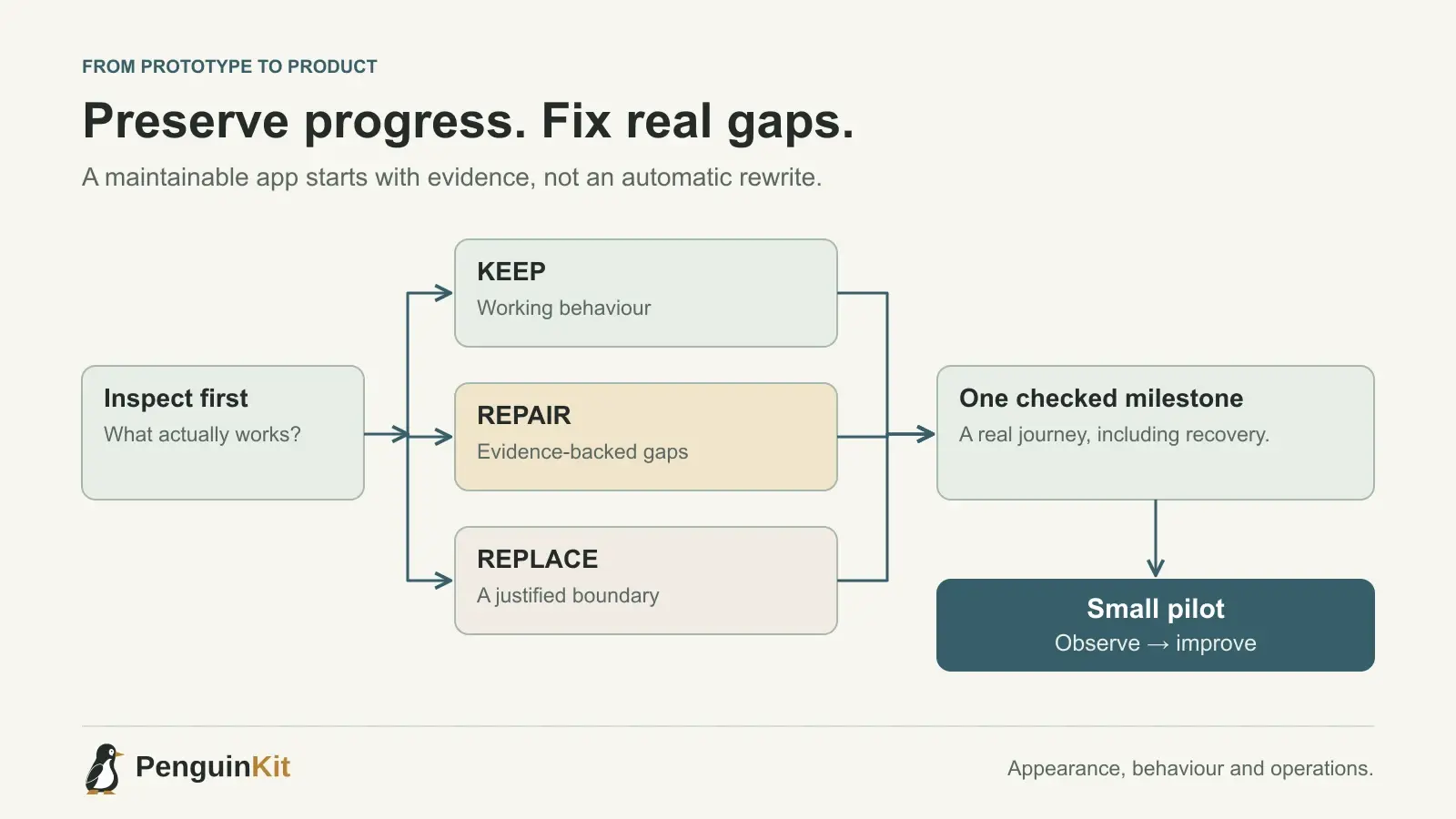
Evaluate a component by its current behaviour and the cost of changing it. Keep a simple module that performs its job and is understandable. Repair a localized defect when the surrounding approach remains suitable. Replace a component when there is evidence that it cannot meet the required boundary or would be harder to maintain than a focused alternative.
A tangled form does not automatically justify replacing authentication. A missing ownership check does need attention before exposing private records, even if the rest of the interface works. Ask the builder to separate those findings and explain the effect of each proposed change.
GitHub's responsible-use guidance for Copilot coding agents emphasizes reviewing and validating agent-generated changes. Treat that as part of the handoff: generated work still needs inspection in the actual application.
Choose one improvement with a visible outcome
For the appointment app, a useful milestone might be “a signed-in staff member can confirm a pending request without affecting another team's requests.” That is specific enough to implement and check while preserving the existing form.
Write the expected result, the boundary and one failure case:
Milestone: staff can confirm a pending appointment request.
Keep: the existing request form and pending status.
Boundary: staff can act only on their team's requests.
Check: confirmation persists after reload; another team is denied.
Failure: a repeated click must not create duplicate confirmations.
This is more actionable than a request to clean up the whole codebase. It also creates a working checkpoint from which the next feature can proceed.
Add proportionate release and recovery checks
For a hosted app, keep development credentials separate from production credentials and verify the actual deployed environment. Before changing a live data structure, understand the migration and recovery plan. A code rollback alone does not reverse a database change or undo an external message.
For a small pilot, a documented release sequence and tested backup restore can be more useful than an elaborate delivery platform nobody understands. As usage and risk grow, strengthen automated checks, staging, monitoring and access controls.
Define who can publish, where configuration is stored and how you know the core journey still works after release. Do not publish real customer records as test fixtures. Our first-user checklist covers the practical boundaries to verify.
Make the handoff usable by the next builder
Give a developer or a new coding agent the repository, setup instructions, a fictional sample, the current decisions and the next agreed task. Share credentials through appropriate access controls rather than placing passwords inside the handoff document.
Ask the next builder to inspect existing work before applying a generated plan. A plan can be a useful foundation while still differing from what the prototype has already implemented. Resolve meaningful differences before changing code.
PenguinKit helps organise project direction and implementation guidance for that next stage; it does not certify or automatically repair an existing codebase. Describe your current project and explain what already exists, what works and what you want to improve next. A good handoff lets useful work continue without making the next person guess.
Give your idea a clear starting point.
Bring an idea or an existing brief. PenguinKit helps you shape a project foundation you can review, refine and build from.
Start your project