
AI can write useful software and help find defects, but an AI-generated app is not guaranteed to be error-free. A successful build, a clean-looking interface or a confident review does not establish that the software meets every requirement under every operating condition.
For a founder, the useful question is more specific: what evidence do we have that this version behaves correctly for its intended users, protects important boundaries and recovers safely when something goes wrong?
That question leads to a release you can assess. “Make it bug-free” gives neither the coding agent nor the project owner a clear way to establish completion.
Why software can look correct and still be wrong
Imagine a small booking app. A customer chooses a slot, receives a confirmation and sees it in their account. The demonstration works. Yet two customers submitting the same slot together might both receive a booking, or one customer might be able to request another customer’s record directly.
Those defects are not necessarily visible in the main screen. They sit in concurrency and authorization boundaries. A polished demonstration can miss them because it follows one successful path with one user at a time.
Generated code can also faithfully implement the wrong interpretation. “Members can cancel bookings” leaves open whether cancellation is allowed after the service is completed. You do not need to settle every future policy before starting, but a consequential boundary needs an explicit decision or a clearly labeled assumption before implementation relies on it.
AI assistance does not remove the need for verification
GitHub’s responsible-use documentation for coding agents states that generated code can be inaccurate or insecure and should be reviewed and tested. The limitation is relevant even when the code appears valid.
AI review is useful as another perspective. It can identify omissions, suggest failure cases and explain unfamiliar code. But a second AI statement that “everything looks good” is still a review result, not an executed test of the running system.
The same distinction applies to generated test files. A test may assert the wrong rule, skip an important path or replace a real dependency with a mock that removes the failure. Inspect what the check actually establishes.
Define correctness around the project’s important outcomes
Start with the promises the project needs to keep. For a booking app, these might include:
- A customer can create and later retrieve their own booking.
- Confirmed bookings do not exceed the available capacity.
- One customer cannot read or change another customer’s booking.
- An interrupted request has a recoverable outcome.
- Cancellation follows the policy the owner has actually chosen.
A local file tool has a different set of promises: originals remain unchanged, invalid input is reported and output goes to the intended location. A reporting automation may need duplicate prevention and a visible failure record, without any customer sign-in screen.
This is why a universal enterprise checklist is a poor substitute for project understanding. The checks should follow the real behavior and consequence of failure.
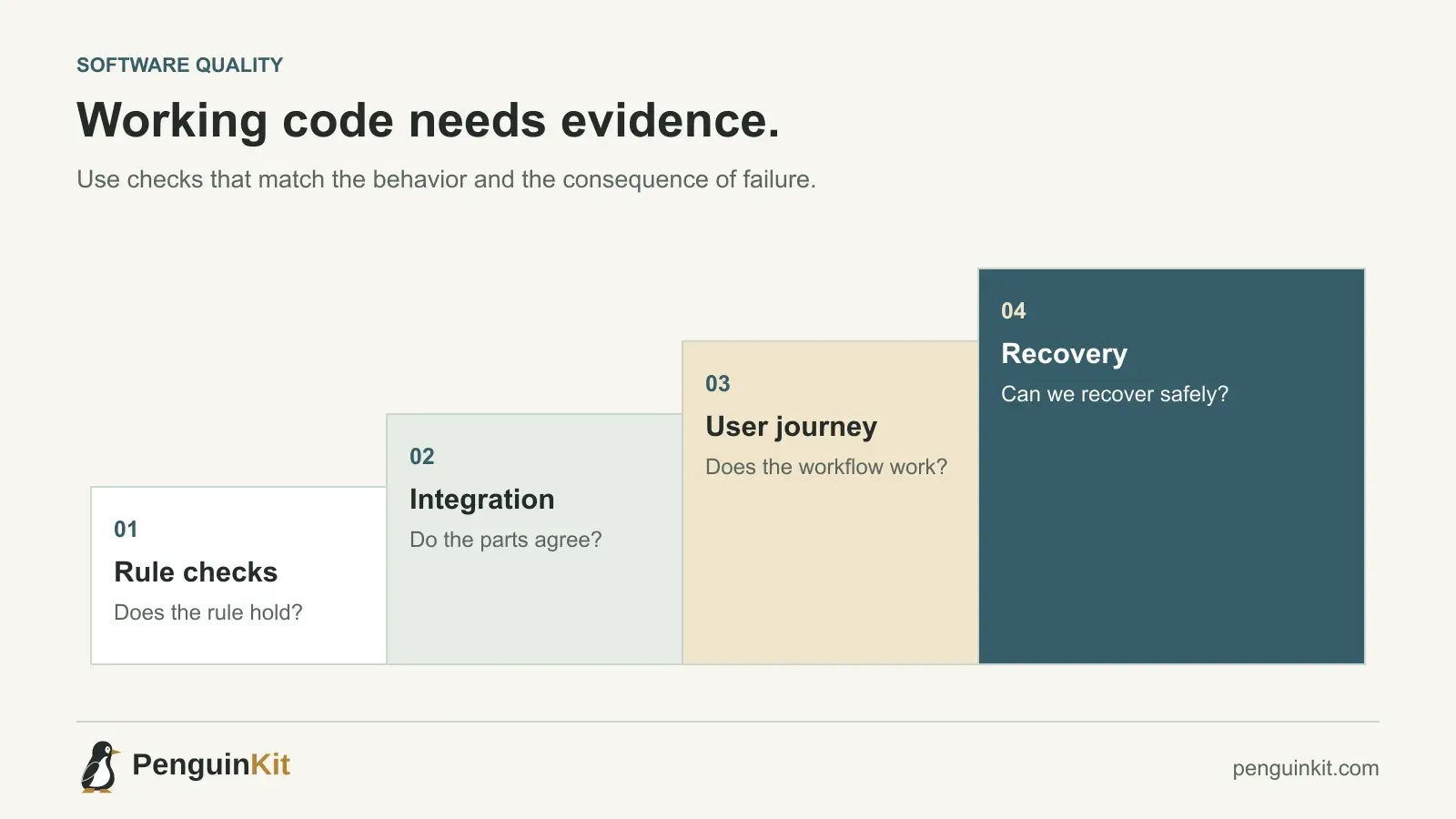
Build evidence in layers
Check the individual rule
Use a focused automated check where a rule can be tested independently. Include a normal input, an important boundary and a relevant invalid input. For a date calculation, make the reference date explicit so the result does not depend on when the test runs.
Check the integration
Verify that components agree about data and state. A route may validate correctly while the database accepts a contradictory value through another path. A worker may finish correctly while its result is associated with an obsolete version.
Check the user journey
Exercise what the person actually does: sign in, submit, wait, refresh and retrieve the result. Include more than the happy path when failure has meaningful consequences.
Check release and recovery
For hosted or stateful work, verify the relevant configuration and migration path in a suitable test environment. Decide how to pause a bad release and recover valuable state. A local utility may only need a safe invocation procedure and recoverable outputs.
Each layer answers a different question. None should be represented as evidence for a layer it did not exercise.
Turn a vague confidence claim into a release record
Ask your builder to report the version checked, the commands or manual actions performed, the observed results and the remaining uncertainties. The record can be short:
Version checked: the current candidate commit.
Behavior checked: one booking, duplicate request and ownership access.
Result: normal and replay cases passed; permission case failed.
Release decision: correct the permission boundary before inviting users.
Not checked: production email delivery and external calendar integration.
That is more useful than a percentage confidence score without supporting evidence. It tells you what to fix and prevents an untested integration from being mistaken for a completed one.
Ask AI for challenging checks, not reassurance
A stronger verification prompt is:
Review the intended workflow and current implementation.
Identify the highest-consequence ways it could violate the scope,
ownership rules or recovery expectations.
Propose focused checks for those boundaries.
Run the authorized checks in the stated environment and report
observed results separately from proposed or skipped checks.
Do not weaken a requirement merely to obtain a passing result.
Keep the scope proportionate. A personal text converter does not need the same operating controls as a service handling money or private records. Both need honest evidence for the behavior they promise.
Can formal methods prove software is correct?
For suitable components, formal techniques can establish particular properties under explicitly stated assumptions. That is narrower than proving an entire deployed product free of every defect. The specification, environment, integrations and assumptions still matter.
Most early products benefit first from clear rules, small changes, meaningful tests and a practical recovery path. Use specialist methods when the risk and problem justify them, rather than treating sophisticated terminology as proof of safety.
Where a project foundation helps
PenguinKit helps organize the intended outcome, scope, important decisions, technical approach and implementation milestones. That gives a coding tool or developer a clearer basis for choosing checks and preserving requirements.
The documents are a foundation for building and verification. They are not executed tests, a security audit or a certification of the finished app. Use the plan to guide implementation, then collect evidence from the actual system as it evolves.
For a practical next step, read how to plan with PenguinKit or how to repair an existing AI-built app.
Common questions
Can AI write code that works correctly?
Yes. AI can produce correct implementations for many defined tasks. That does not establish correctness for every input, integration or future change without appropriate verification.
Do passing tests mean my app has no bugs?
They establish that the tested checks passed in the tested environment. Their value depends on which behavior and risks they cover, and whether their expectations are correct.
What should I aim for instead of “100% bug-free”?
Aim for a clearly scoped release with evidence for important behavior, known limitations, appropriate safeguards and a supported recovery process. Continue improving the checks as real use reveals new information.
Give your idea a clear starting point.
Bring an idea or an existing brief. PenguinKit helps you shape a project foundation you can review, refine and build from.
Start your project